4:03 p.m.
Hi Maury,
We are currently working on creating a deployment package for Podman Desktop that can be
installed across multiple machines. Our goal is to include the Podman engine within this
package so that users do not need to perform manual setup steps after installation.
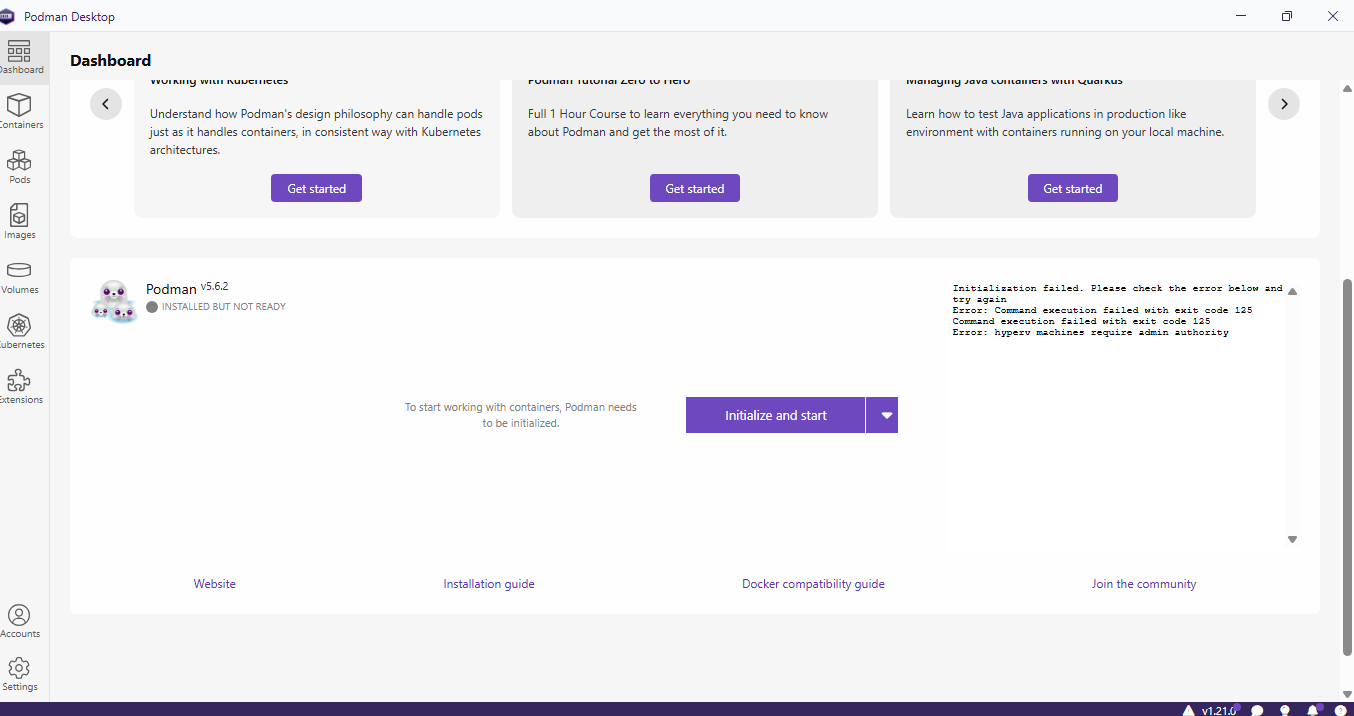
When we deploy the package on other machines, we encounter initialization errors (as shown
in the attached screenshot). These errors seem related to missing configurations that are
normally handled manually according to the official documentation.
Could you please advise on the recommended approach to:
*
Bundle Podman engine with Podman Desktop in a single package
*
Ensure that all necessary configurations are applied automatically during installation
*
Avoid requiring users to follow manual steps from the installation guide
Our aim is to fully automate the setup process for a seamless user experience. Please
refer to the documentation for any specific steps we should incorporate. Thank you for
your guidance.
Best regards,
Sekar Sivaguru
[cid:4d56e2b9-3d7d-42ff-b4c9-cf24f7956872]
________________________________
From: Jean-Francois Maury <jmaury(a)redhat.com>
Sent: Monday, December 8, 2025 11:44 AM
To: Sekar Sivaguru <sivaguru.sekar(a)hm.com>; podman-desktop(a)lists.podman.io
<podman-desktop(a)lists.podman.io>; podman(a)lists.podman.io
<podman(a)lists.podman.io>
Subject: Re: [Podman-desktop]Podman Desktop fails to detect WSL2 even though installed –
Need vendor guidance
Can you provide more details on the scenario? When does it happen? What's the error
message?
Thanks
Jeff
Le 5 décembre 2025 20:54:14 Sekar Sivaguru via Podman-desktop
<podman-desktop(a)lists.podman.io> a écrit :
Dear Team
Podman Desktop fails to detect WSL2 even though wsl --version confirms WSL2 is installed.
Is this a known issue? What is the official fix or configuration required to ensure Podman
Desktop consistently detects WSL2 across multiple devices when installing Podman?”
Request for Clarification:
* Why does Podman Desktop fail to detect WSL2 in this scenario?
* Is this a known issue or configuration requirement?
* What is the official fix or recommended steps to ensure Podman Desktop consistently
detects WSL2 across multiple devices?
Thank you for your support.
Best regards,
Sivaguru Sekar
THE INFORMATION CONTAINED IN THIS EMAIL MESSAGE MAY BE PRIVILEGED, CONFIDENTIAL, AND
PROTECTED FROM DISCLOSURE ANY UNAUTHORIZED USE, PRINTING, COPYING, DISCLOSURE OR
DISSEMINATION OF THIS COMMUNICATION MAY BE SUBJECT TO LEGAL RESTRICTION OR SANCTION IF YOU
THINK THAT YOU HAVE RECEIVED THIS E-MAIL MESSAGE IN ERROR, PLEASE REPLY TO THE SENDER AND
DELETE THIS MESSAGE FROM YOUR COMPUTER.
_______________________________________________
Podman-desktop mailing list --
podman-desktop@lists.podman.io<mailto:podman-desktop%40lists.podman.io>
To unsubscribe send an email to
podman-desktop-leave@lists.podman.io<mailto:podman-desktop-leave%40lists.podman.io>
Envoyé avec Aqua Mail pour
Android<https://link-aquamail.dynalinks.app/dl/signature>